


Why You Should Listen to Me
Let’s be honest: the internet is currently a gold rush for AI video tools, and everyone is trying to sell you the “magic button” that will make you a millionaire on YouTube overnight. In 2026, the noise is louder than ever. You’ve probably seen the ads for Videogen.io claiming you can create viral videos in seconds. But as someone who lives and breathes video production—a total “video nerd” who manages clients, runs multiple channels, and spends way too much time in the editing trenches—I know that “fast” doesn’t always mean “profitable.”
I’m a real person, not an AI avatar. My name is Randolph, and I’ve spent years testing every piece of software that hits the market to see what actually helps my workflow and what is just shiny, expensive junk. I’m writing this because I’ve spent the time (and the money) under the hood of Videogen.io to give you a no-BS, honest breakdown. My goal isn’t to sell you a dream; it’s to show you exactly where this tool fits into a professional creator’s toolkit and where it falls flat on its face.
In this deep dive, we aren’t just going to look at the buttons you can click. We are going to talk about the 2026 content landscape, how platform algorithms like TikTok and YouTube are evolving in their treatment of AI content, and why your choice of software could be the difference between a video that goes viral and one that gets your account flagged for “low-effort” content. If you’re a solopreneur, a business owner, or a budding content creator, stick around. This might save you $24 a month—or it might save you 20 hours of work a week.
What Exactly is Videogen.io?
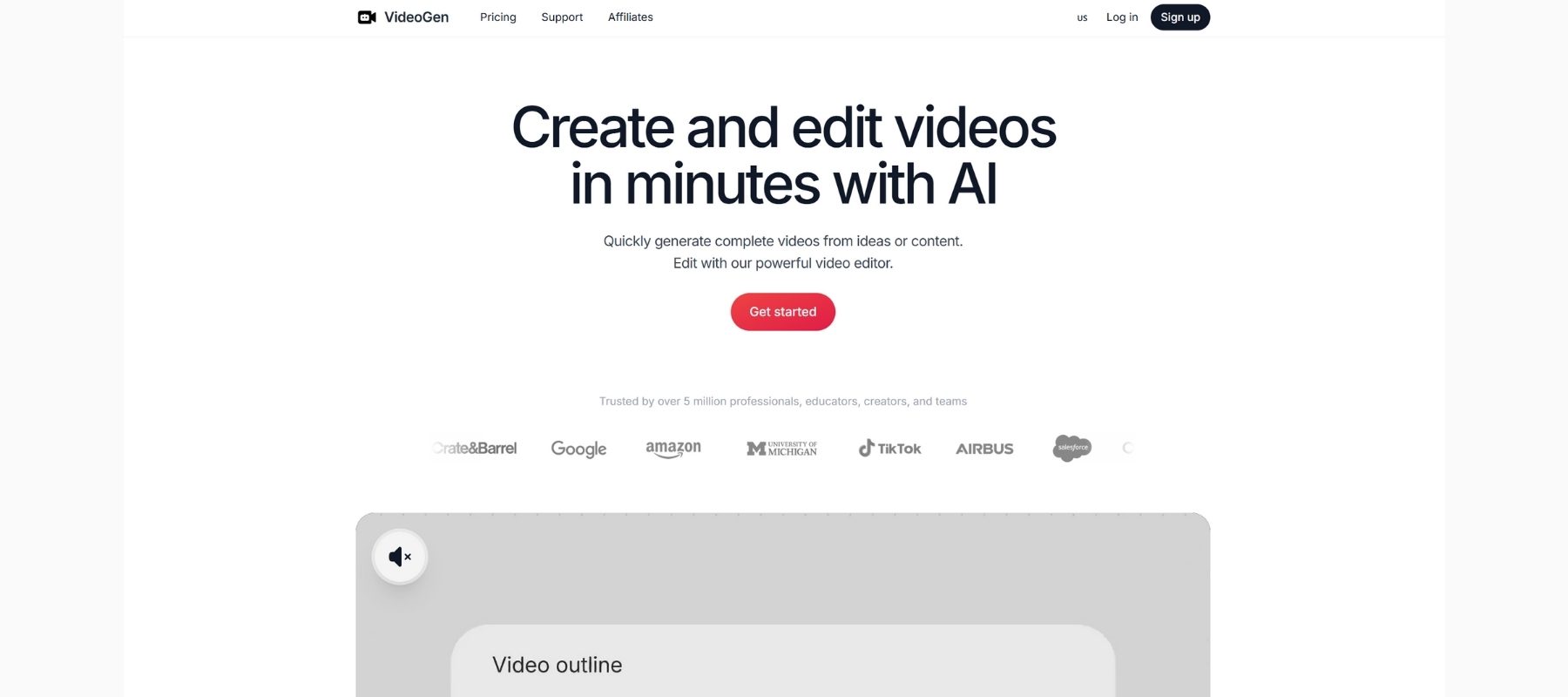
To understand Videogen.io, you first have to separate what it actually does from the buzzwords used in its marketing. In its simplest form, Videogen.io is a productivity-focused video creation platform that specializes in “Text-to-Video” automation. It isn’t a traditional video editor like Adobe Premiere or DaVinci Resolve; instead, it’s an assembly line. You provide a script, and the platform uses its algorithms to find visual matches and stitch them together into a coherent timeline.
In the 2026 landscape, Videogen has carved out a niche by offering three distinct “paths” for creators. Depending on your brand’s aesthetic and your budget, you’ll likely find yourself leaning into one of these three creation modes:
| Mode | Technology Used | Best For |
|---|---|---|
| Stock Footage Mode | Semantic Search + Third-Party Libraries | Generic B-roll, educational content, and “top 10” style videos. |
| Generative AI Mode | Diffusion-based Image Generation | Abstract concepts or specific niche scenes that don’t exist in stock libraries. |
| iStock Premium | High-End Professional Licensing | Commercial-grade videos and high-authority brand content. |
Understanding the “Glue” of Video: Stock Footage & B-roll
One of the most important concepts I want to drive home—especially if you’re new to the world of content—is the role of B-roll. In the video nerd world, “A-roll” is your primary footage (like me talking to the camera right now). B-roll is everything else. It’s the footage of someone typing on a phone, a sunset, or a city street that plays while the narrator is talking.
Without B-roll, a video is just a “talking head,” which is the fastest way to lose a viewer’s attention in 2026. This is where Videogen.io shines. It acts as an automated researcher that finds this “glue” for you. Instead of you spending $100 a month on a Storyblocks or Getty Images subscription and then manually searching for “man drinking coffee,” Videogen’s AI scans your script, identifies the key themes, and pulls those clips in for you automatically.
It is designed for the creator who is a “one-man show.” If you don’t have a team of editors and you don’t have twelve hours a day to hunt for clips, this platform is built to be your virtual assistant. However, as we will discuss in the coming sections, the quality of that assistant depends entirely on which of these three modes you decide to use.
The Real Strength: A B-Roll Scavenger Hunt on Autopilot
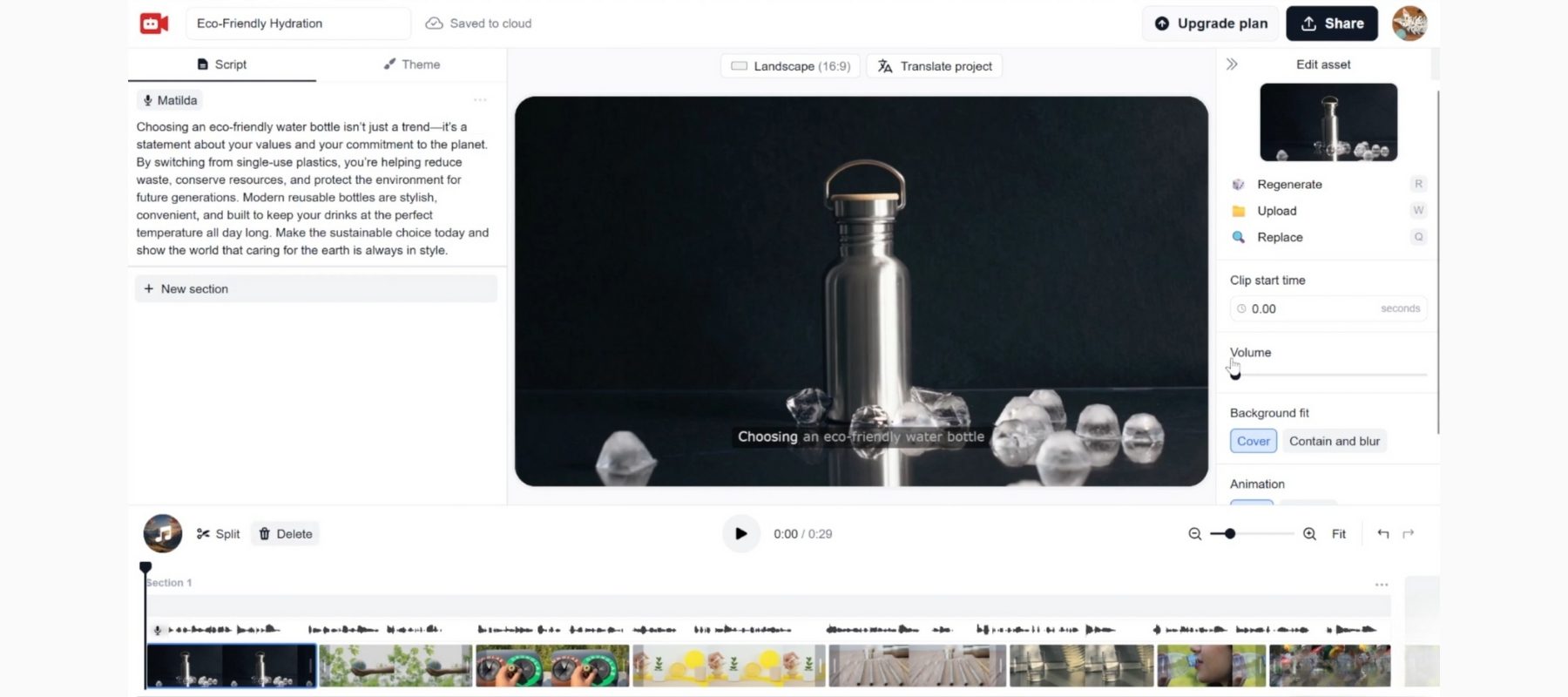
If you’ve ever sat in front of an editing timeline with a great voiceover but a completely empty video track, you know the soul-crushing boredom of the “B-roll Scavenger Hunt.” This is the single biggest bottleneck for most creators. In the old world of editing, you would have to listen to your script, write down timestamps for visual changes, log into a site like Storyblocks, search for “modern office aerial shot,” download it, import it, and then trim it to fit. Multiply that by 50 clips for a 10-minute video, and you’ve just lost your entire Saturday.
This is where Videogen.io moves from being “just another tool” to being a genuine productivity powerhouse. When I use this tool, I’m not looking for it to create a masterpiece; I’m looking for it to do the grunt work. Its primary strength lies in its Semantic Search Integration. It doesn’t just look for keywords; it attempts to understand the context of your sentence to pick a clip that matches the vibe.
The Efficiency Breakdown: Manual vs. Videogen
To give you a clear picture of why I find this valuable, let’s look at the actual time investment for a standard 60-second social media reel:
| Task | Manual Editing Workflow | Videogen.io Workflow |
|---|---|---|
| Clip Sourcing | 45–60 minutes (Searching & Downloading) | 2–3 minutes (Auto-populating) |
| Timeline Assembly | 20 minutes (Trimming & Snapping) | 0 minutes (Pre-aligned to script) |
| Asset Licensing | Manual tracking per clip | Included in the subscription |
| Total Time | ~80 Minutes | ~5 Minutes |
Why “Good Enough” is the 2026 Standard
One thing I’ve learned as a full-time creator is that perfection is the enemy of profit. For a lot of my clients, we don’t need every single frame to be a custom-shot cinematic marvel. We need the video to be visually engaging enough to keep the viewer from scrolling past.
Videogen allows me to hit that “80% quality” mark almost instantly. This is particularly useful for:
- Educational Channels: Where the information is the star, and the visuals just need to provide context.
- Faceless “Cash Cow” Channels: Where high volume and low overhead are the keys to sustainability.
- Social Media Teasers: Quick clips to drive traffic to a longer, more detailed post.
However, I have to give you a warning: while the speed is incredible, the uniqueness can suffer. Since many creators use the same stock libraries, you might start seeing the same “smiling woman in a meeting” clip on five different channels. But for the price of $24 a month for unlimited videos, the trade-off of “time saved” versus “originality” is a deal I’m willing to take for a large portion of my daily content.
The Truth About Videogen’s “AI Video”
If you’re coming to Videogen.io expecting it to be a competitor to something like OpenAI’s Sora or the latest high-end generative models, I need to pause you right there. There is a lot of “air quotes” AI marketing in the industry right now, and Videogen is no exception. While the platform claims to offer “AI Video Generation,” there is a fundamental technical distinction that I discovered during my testing that every creator needs to understand before they subscribe.
In its current 2026 iteration, Videogen’s “AI Video” mode isn’t actually generating video—it’s generating high-fidelity AI still images. Once those images are generated based on your prompt, the software applies what we in the industry call the “Ken Burns Effect.” This is a simple pan-and-zoom animation that gives the illusion of motion.
The Technical Reality: Still vs. Motion
To understand why this matters, let’s look at how this compares to true generative video models:
| Feature | Videogen.io “AI Video” | True Generative AI (e.g., InVideo/Sora) |
|---|---|---|
| Primary Output | Static Image (.jpg/.png) | Sequential Frames (.mp4) |
| Internal Physics | None (Static) | Complex (Hair blowing, liquid pouring, walking) |
| Motion Type | Software Zoom/Pan | Temporal Consistency/Object Movement |
| Processing Time | Near Instant | Minutes to Hours |
Why This Is (and Isn’t) a Dealbreaker
I don’t want to sound like I’m just bashing the tool. For many creators, a high-quality AI-generated image with a smooth zoom is perfectly adequate for a background visual. It looks “clean,” and it avoids the “uncanny valley” weirdness that you often get with cheap generative video (like people having six fingers or melting into chairs).
However, as a “video nerd,” I find it slightly frustrating when tools aren’t transparent about this. If your script requires a character to perform a specific action—like a chef flipping a pancake—Videogen will likely just show you a beautiful, static image of a chef holding a pan, while the camera slowly zooms into his face.
The Verdict on AI Mode: If you need atmosphere (a futuristic city, a serene forest, a cyberpunk office), this mode works great. But if you need action or narrative movement, you are going to find this incredibly limiting. Most of the time, I find myself switching back to the “Stock Footage” mode because a real clip of a person walking always feels more “premium” than a zoomed-in AI photo. If you want the “wow” factor of a character interacting with their environment, you’ll need to look at the more expensive alternatives we’ll discuss in the next section.
The 2026 AI Video Battleground: Where Does Videogen Stand?
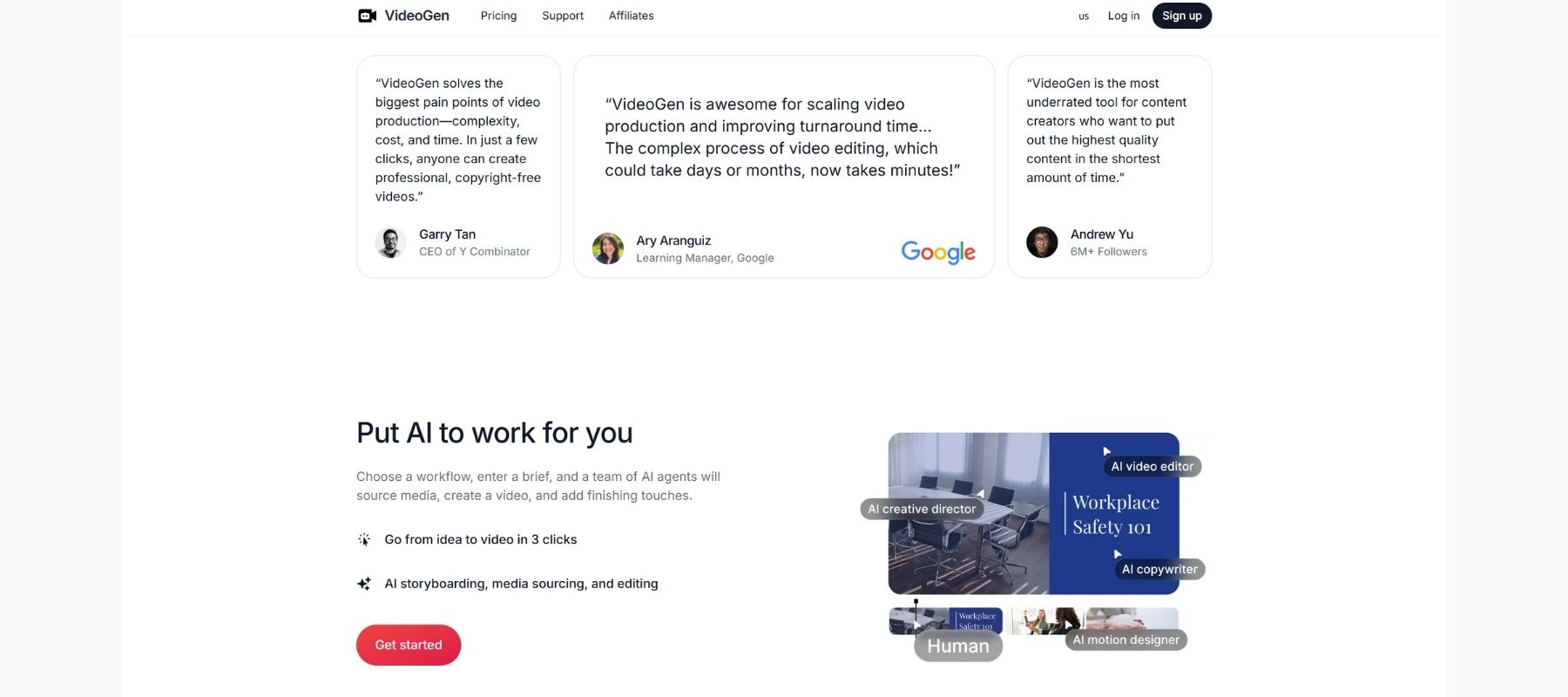
In 2026, the “AI Video” market has split into three distinct tiers: budget-friendly automation, mid-range creators, and high-end cinematic tools. To figure out if Videogen.io is actually a good deal, we have to look at what its neighbors are charging and what they are delivering. I’ve spent the last few months bouncing between these platforms for different client projects, and the differences in both price and performance are staggering.
Below is the definitive 2026 comparison table. I’ve focused on the entry-level paid tiers, as that’s where most solo creators live.
| Tool | Core Identity | 2026 Starting Price | Visual Quality | Best For |
|---|---|---|---|---|
| Videogen.io | The B-Roll Machine | $24/mo (Unlimited) | Good (Stock) / Static (AI) | Fast, high-volume social clips. |
| InVideo AI | The All-Rounder | $28/mo | High (True Generative) | Narrative videos with real movement. |
| HeyGen | The Human Avatar | $29/mo | Exceptional (Faces) | Training, sales, & “Talking Head” content. |
| Google Veo 3 | The Hollywood Pro | $249/mo (Ultra) | Peak Realism (4K) | High-budget ads and cinematic art. |
Deep Dive: Choosing Your Weapon
1. Videogen.io vs. InVideo AI (The Battle for Movement) If you have an extra $4 in your monthly budget, InVideo AI is often the stronger choice for narrative content. Unlike Videogen, which uses static images with a zoom, InVideo has integrated models like Sora 2 and its own generative engine that create “true” video. If your script says “a dog runs through a park,” InVideo will generate a video of a dog actually running. Videogen will give you a photo of a dog and zoom in on its tail. If you need action, go with InVideo. If you just need speed, stick with Videogen.
2. Videogen.io vs. HeyGen (The Human Element) I use HeyGen specifically when a video needs a “face.” If you are building a personal brand but are too shy to be on camera, HeyGen is the gold standard. It allows you to create a “Digital Twin”—an avatar that looks and moves exactly like a human. Videogen doesn’t really do avatars; it’s focused on the background scenery. For educational courses or corporate explainers, HeyGen’s $29/month plan is a better investment.
3. The “Veo 3” Gap Then there’s Google Veo 3. At $249.99/month for the “Ultra” tier, this is in a completely different league. It is the only tool on this list that understands complex physics—like how water splashes or how light reflects off a moving car. While Google does offer a $19.99 “AI Pro” tier, it limits you to “Veo 3 Fast,” which often comes with watermarks and lower resolution. Unless you are a professional agency or a high-end filmmaker, this is likely overkill for your daily YouTube Shorts.
The 2026 Hierarchy: I tell my clients that Videogen is the “entry-level” tool. It’s the Toyota Corolla of AI video—reliable, affordable, and gets you from point A to point B. But if you want to win a race (or a cinematography award), you’re going to have to look at the specialized tools above it.
The Pros and Cons: My Personal Scorecard
After spending dozens of hours inside the Videogen.io dashboard, I’ve moved past the “honeymoon phase” and can give you a raw look at the pros and cons. In 2026, the standard for what makes a “good” video tool has shifted. It’s no longer about whether a tool can make a video—it’s about whether that video can actually compete for attention in a crowded feed.
Here is my honest scorecard based on real-world usage for client projects and my own channels.
The Pros: Why It Earns Its Keep
- Unrivaled Speed: I can go from a blank page to a rendered 1080p video in under 10 minutes. If you are a solopreneur, this isn’t just a feature; it’s a lifeline.
- Massive Asset Library: With access to over 3 million copyright-free assets (including stock from giants like iStock on higher tiers), I rarely find myself “missing” a shot. The semantic search is smart enough to know that if I mention “growth,” it should show me a sprout growing or a stock market chart, not just a picture of a ruler.
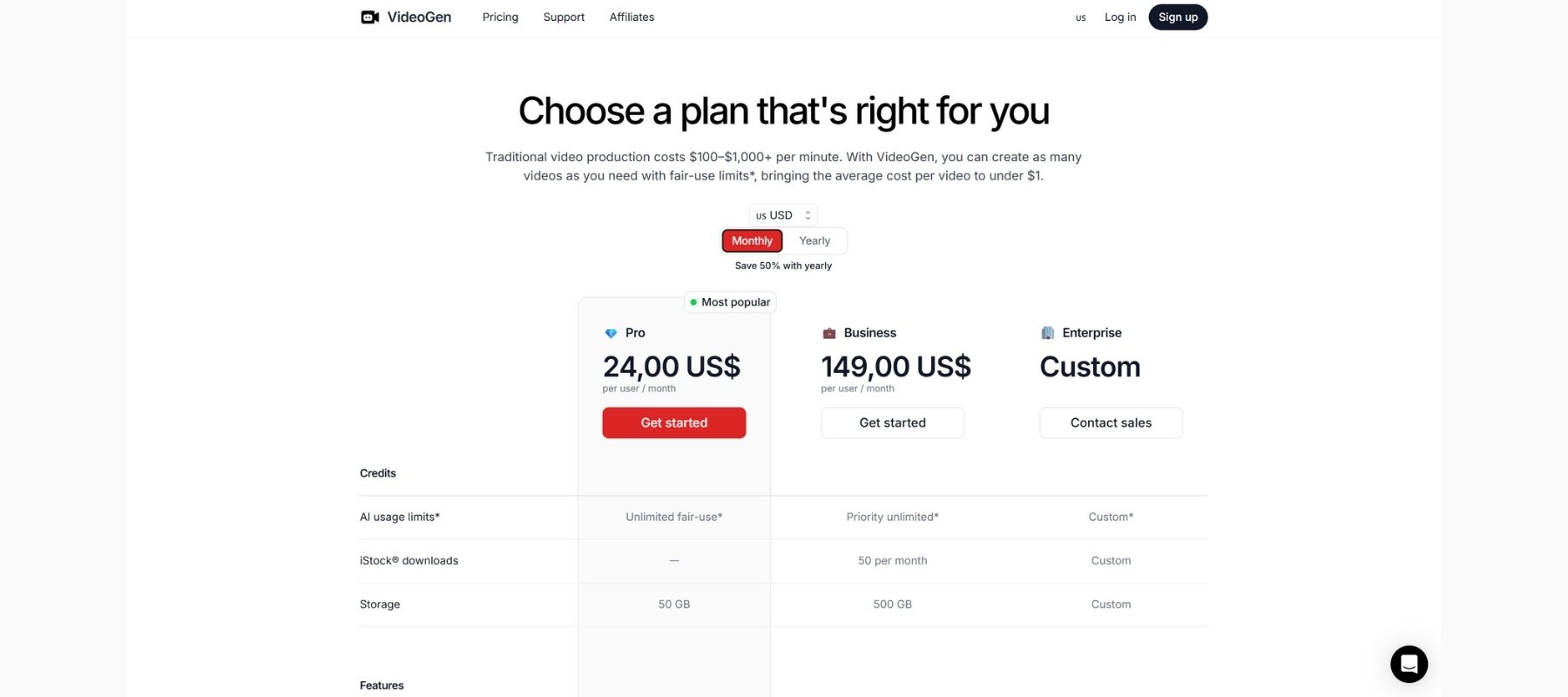
- The “Unlimited” Factor: In an era where most AI tools (like Sora or Runway) charge you per second of generation, Videogen’s $24/month Pro plan offers “unlimited fair-use” exports. For someone making 20–30 Reels a month, this is the most cost-effective tool on the market.
- Low Barrier to Entry: You don’t need to know what a “keyframe” or a “proxy” is. The interface is designed for what I call the “non-editor”—if you can use Google Docs, you can use Videogen.
The Cons: Where the Frustration Starts
- The “Still Shot” Problem: As I mentioned before, the “AI Video” is actually just static images with a zoom. If your brand relies on high-energy, dynamic movement, these sections will feel “flat” compared to true generative video.
- Robotic Audio: I’m going to be blunt: I really dislike the built-in AI voices. While they’ve improved in 2026, they still lack the emotional cadence needed for storytelling. If you use them, your video immediately screams “I am a faceless AI bot,” which can lead to lower trust from your audience.
- Generic Aesthetic: Because it relies heavily on stock footage, your content can end up looking like a corporate HR training video if you aren’t careful.
- Platform Bias: I’ve noticed that TikTok’s 2026 algorithm is becoming incredibly efficient at detecting “pure stock” videos. If you don’t add your own “human” element (like your face or a unique voice), you might find your reach being throttled.
| Metric | Rating | My Personal Note |
|---|---|---|
| Workflow Speed | ⭐⭐⭐⭐⭐ | The fastest tool I own. Period. |
| Visual Realism | ⭐⭐ | Great for stock; weak for generative movement. |
| Voice Quality | ⭐⭐ | Use it only as a placeholder; replace it in post. |
| Value for Money | ⭐⭐⭐⭐⭐ | Hard to beat $24 for unlimited content. |
| Creative Control | ⭐⭐⭐ | Good for quick edits, but frustrating for pros. |
The Bottom Line: Videogen.io is a “Productivity Tool,” not a “Cinema Tool.” It is built to help you win the volume game, but it won’t help you win an Oscar. If your goal is to stay consistent and keep your “upload streak” alive without burning out, the pros far outweigh the cons.
Pro Strategy: How I Make Videogen Videos Look Professional
If you simply paste a script into Videogen and hit “Generate,” you’ll end up with a video that looks like every other generic AI channel. In 2026, the “low-effort” aesthetic is a death sentence for your engagement metrics. To truly succeed, I use a Hybrid Workflow that leverages Videogen’s strengths while masking its weaknesses.
Here is my step-by-step “Pro Strategy” for creating high-authority content that doesn’t feel like a bot made it.
1. The Audio Hack: The “ElevenLabs” Integration
As I mentioned earlier, the built-in voices in most AI tools—including Videogen—often lack the emotional nuances of a human. To fix this, I never use the internal text-to-speech. Instead, I use ElevenLabs (specifically the Eleven v3 Expressive model released in early 2026) to generate my narration first.
My Professional Settings for ElevenLabs:
- Model: Eleven v3 (Expressive). It handles pauses, breathing, and emphasis much better than older versions.
- Stability: 40%–50%. This allows for more “personality” and variation in tone.
- Similarity Enhancement: 75%. This ensures a high-fidelity match if you are using a cloned version of your own voice.
- Style Exaggeration: 15%. Just enough to keep it from being monotone without sounding like a cartoon.
Once the audio is generated, I use Videogen’s “Voiceover to Video” (Pro) feature. This allows me to upload my high-quality MP3, and Videogen then builds the B-roll around the timing of that professional voiceover rather than the other way around.
2. The 20/80 Hybrid Rule
In 2026, audiences are craving human connection. Purely faceless stock videos often feel cold and untrustworthy. I follow the 20/80 Rule:
- 20% A-Roll (The Human): I record myself for the “Hook” (the first 5 seconds) and the “CTA” (the last 5 seconds) using my phone.
- 80% B-Roll (The Machine): I use Videogen to fill the middle 40–50 seconds with fast-paced, high-quality stock footage.
By showing your face at the start, you build an immediate bond with the viewer. When the video cuts to the Videogen B-roll, the viewer still hears your voice (or your clone) and maintains that connection.
3. Prompt Engineering for Better Clips
Videogen’s AI is only as smart as your instructions. Instead of generic terms, use Visual Context in your prompts.
| Weak Prompt | Pro Prompt (2026 Standard) |
|---|---|
| “A man working” | “Modern freelancer in a sunlit loft, working on a MacBook, cinematic lighting, shallow depth of field.” |
| “City at night” | “Cyberpunk Tokyo street, neon reflections in puddles, 4K handheld camera movement.” |
| “Success” | “Close-up of a diverse team high-fiving in a glass office, slow-motion, warm color grade.” |
4. Avoiding “Stimulation Saturation”
A major trend in 2026 is a move away from hyper-edited “retention editing” (flashing captions every 0.5 seconds). My strategy is to let the clips breathe. I set Videogen to change clips every 3 to 5 seconds rather than every 1 second. This makes the content feel more authoritative and less like a “brain-rot” TikTok meant for a three-second attention span.
By combining a cloned human voice, custom A-roll, and descriptive prompting, you turn Videogen from a simple app into a professional production studio that costs a fraction of a traditional agency’s fee.
FAQs
As we move further into 2026, the rules around AI video are changing almost weekly. Whether you are worried about YouTube’s latest algorithm updates or just trying to figure out if you can legally sell the videos you make, I’ve compiled the most common questions I get from my clients and fellow creators.
1. Is it actually possible to monetize Videogen.io videos on YouTube in 2026?
The short answer is yes, but with a massive “if.” YouTube updated its monetization policy in early 2026 to crack down on what they call “Low-Effort Automation.” If you simply generate a raw video from Videogen and upload it without any changes, you risk being flagged for Reused Content or Repetitive Content.
To stay safe, I follow the “Human Value” rule:
- Add Original Commentary: Don’t just use the AI script; add your own unique insights or humor.
- The “Altered Content” Label: In 2026, YouTube requires you to check a box in the Creator Studio if your video contains realistic synthetic media. Since Videogen uses stock and static AI images, you usually won’t need this unless you use a cloned voice that sounds exactly like a real person.
- Transform the Visuals: Move clips around, add your own text overlays, and ensure the video isn’t just a 1:1 copy of a template.
2. Who “owns” the copyright to the videos I create?
This is the “Wild West” of 2026 law. Generally, you own the rights to the final assembly of the video for commercial use, provided you have a paid subscription.
- Stock Footage: You have a commercial license to use the clips as part of your video, but you don’t own the individual clips themselves.
- AI Generated Images: Current 2026 legal precedents suggest that AI-only outputs cannot be copyrighted. However, because you are arranging them, adding text, and syncing audio, the “composite work” is usually yours to protect.
3. Does Videogen.io have a free trial?
As of February 2026, Videogen has moved away from a traditional “free forever” model. Instead, they typically offer a limited generation trial (usually 1–2 videos with watermarks) so you can test the interface. Most serious creators will need the Pro Plan at $24/month to remove watermarks and access high-definition exports.
4. Can I use Videogen for long-form content (10+ minutes)?
While you can, I wouldn’t recommend it as your only tool for long videos. Videogen’s strength is its “snap-to-script” speed, which works best for 60-second Reels or 3-minute explainers. For a 20-minute video essay, the repetitive nature of stock footage can become boring. In those cases, I use Videogen to create individual scenes and then stitch them together in a more robust editor like Premiere Pro.
5. How does Videogen handle “complex” or “unrealistic” prompts?
This is where the tool shows its limits. In my testing, I tried a prompt for “a grandma on a police car chase.” Because Videogen relies on stock footage and static AI images, it struggled. It gave me a static photo of an elderly woman and a separate photo of a police car. If you need complex physical interactions (like someone jumping, fighting, or dancing), you are better off using a high-end tool like Google Veo 3 or Runway Gen-3.
| Feature | Status |
|---|---|
| Commercial Rights | Included (Paid Plans) |
| Max Resolution | 1080p (Pro) / 4K (Business) |
| API Access | Available on Business/Scale Plans |
| Storage Limit | 50 GB (Pro) |
| Refund Policy | 7-day satisfaction window (check latest TOS) |
Final Verdict: To Buy or Not to Buy?
After putting Videogen.io through its paces in the demanding 2026 content market, I’ve reached a definitive conclusion. Like any tool in my bag, it isn’t a “silver bullet” for success, but it is a highly specialized instrument that serves a very specific purpose.
In 2026, the “Middle Ground” of content is dying. You are either a high-end cinematic creator or a high-volume information distributor. Videogen.io is firmly built for the latter. It is the most efficient bridge I’ve found between having a great idea and having a published video.
You should buy Videogen.io if:
- You are a Solopreneur: You don’t have the budget for an editor and need to produce consistent content to stay relevant.
- You run “Faceless” Channels: You need to churn out educational, news, or trivia content where the information is more important than the “art.”
- You are a B-roll Speed Demon: You already have your own footage or talking head clips and just need a fast way to fill the gaps with professional stock.
- You are on a Budget: $24/month for unlimited exports is, frankly, unbeatable value for the amount of time you save.
You should skip Videogen.io if:
- You need True AI Movement: If your brand requires fluid, generative motion (like Sora-style cinematics), the static “Ken Burns” effect here will feel like a step backward.
- You are a “Premium” Cinematic Brand: If you are selling high-ticket luxury items or artistic services, the stock-heavy feel might dilute your brand’s uniqueness.
- You want “Set it and Forget it”: As I’ve shown in my “Pro Strategy,” you still need to bring your own voice and a bit of human touch to make these videos perform well in 2026.
Final Thought
I keep my Videogen.io subscription active for one reason: consistency. On the days when I’m tired, when my creative tank is empty, or when a client needs a draft “yesterday,” Videogen is the tool that keeps my workflow moving. It isn’t going to win me an Oscar, but it definitely helps me win the “Attention Economy” by keeping my channels active without burning me out.
If you decide to give it a spin, remember my golden rule: Don’t let the AI do 100% of the work. Use it for the heavy lifting, but keep your hands on the steering wheel. Your audience follows you for your perspective—the AI is just there to help them see it more clearly.
