

If you’re an existing TotalAV customer, Total VPN is a basic but effective service that’s worth using. Total VPN passed all of our leak tests, and it unblocked all of Netflix’s geo-restrictions.
Total VPN offers basic VPN functionality: a kill switch and split tunneling, but not much else. We also hope to see Total VPN submit its no-logs policy for third-party auditing so we can feel secure while using it.
We’ll explore Total VPN’s features and functionality so you can determine if it’s what you need in a VPN.
In a Hurry? Here’s a Quick Summary
Total VPN is a relatively new player in the VPN market, offered as part of the TotalAV antivirus package. While it provides basic VPN functionality, it falls short in some areas compared to standalone VPN services. Here’s a quick overview of what I found during my testing:
What You’ll Like:
- Easy-to-use interface
- Integrated with TotalAV antivirus
- Kill switch feature included
- Unblocks some streaming services
- 30-day money-back guarantee
What You May Not Like:
- Limited server network
- Unclear privacy policy
- No advanced features like split-tunneling
- Inconsistent streaming performance
- Limited protocol options
What Makes This Total VPN Review Different?
Many VPN reviews you’ll find online are often copied directly from the product’s website or written by people who haven’t actually used the service. That’s not the case here. For this Total VPN review, I purchased a subscription, installed the software on my personal devices, and thoroughly tested every feature.
I used Total VPN on my Dell XPS laptop running Windows 11, as well as on my Android smartphone. I spent about two weeks testing various aspects of the service, from its installation process to its performance with different online activities. Throughout this review, you’ll find numerous screenshots I took during my testing, giving you a firsthand look at what you can expect from Total VPN.
My goal is to provide you with an honest, impartial evaluation based on real-world usage. I’ll share both the strengths and weaknesses I encountered, so you can make an informed decision about whether Total VPN is right for you.
Buying Total VPN
When it comes to purchasing Total VPN, the process is a bit different from standalone VPN services. That’s because Total VPN is actually part of the TotalAV antivirus package. Here’s what you need to know:
Subscription Options
There’s only one version of Total VPN available, which comes bundled with the TotalAV Ultimate antivirus package. This package includes not just the VPN, but also the antivirus software and an ad blocker. While this might be great if you’re in the market for comprehensive security solution, it might feel a bit much if you’re only interested in a VPN.
At the time of my purchase, TotalAV was offering a significant 70% discount for the first year’s subscription. This kind of promotional pricing is common in the VPN industry, but always keep in mind that the price will likely increase upon renewal.
Free Trial and Money-Back Guarantee
Unfortunately, Total VPN doesn’t offer a free trial. However, they do provide a 30-day money-back guarantee. This gives you a chance to test out the service risk-free for a month, which is pretty standard in the VPN industry.
Purchasing Process
The buying process for Total VPN (as part of TotalAV) is uncomplicated, but there are a few things to keep in mind:
- First, you’ll need to select the TotalAV Ultimate package, as it’s the only one that includes the VPN.
- Next, you’ll enter your payment information. They accept credit cards, PayPal, and Google Pay. I opted for credit card payment for this review.
- Here’s where it gets a bit tricky – you’ll also need to provide your email address, physical address, and postcode. This isn’t great from a privacy standpoint, especially if you’re hoping to maintain anonymity.
After clicking the payment button, I was presented with several upsell offers. These included protection for an unlimited number of devices and a PC cleaner. I declined all these offers as I was only interested in testing the VPN. Once I made it through all the upsells, I finally reached a page with the download link for the installer.
Post-Purchase Communication
After completing my purchase, I received a single email containing my invoice, a download link for the software, and a link to the online dashboard. The process was smooth, but I would have appreciated fewer upsell attempts during checkout.
Installation
Installing Total VPN is a bit different from other VPN services because it’s part of the TotalAV antivirus package. Here’s how the process went for me:
- I downloaded the installer from the link provided in the confirmation email after my purchase.
- Interestingly, you don’t actually install a standalone VPN app. Instead, you’re installing the TotalAV antivirus application, which includes the VPN feature along with other privacy and security modules.
- The installation process was quick and uncomplicated, taking less than a minute to complete.
- There were no choices to make during the installation – it was a simple, one-click process.
- My account was already created during the payment process, so I didn’t need to set up a new one.
When I first launched the app, it updated its virus definitions, and then everything was set and ready to go. The simplicity of the installation process is definitely a plus, especially for users who might be new to VPNs or antivirus software.
One thing to note is that Total VPN allows installation on up to three devices simultaneously. This is a bit limited compared to some other VPN services that offer five or more connections, but it should be sufficient for most individual users.
Overall, the installation process for Total VPN (as part of TotalAV) was extremely easy and user-friendly. However, it’s important to remember that you’re getting more than just a VPN – you’re installing a full antivirus suite.
Our experience
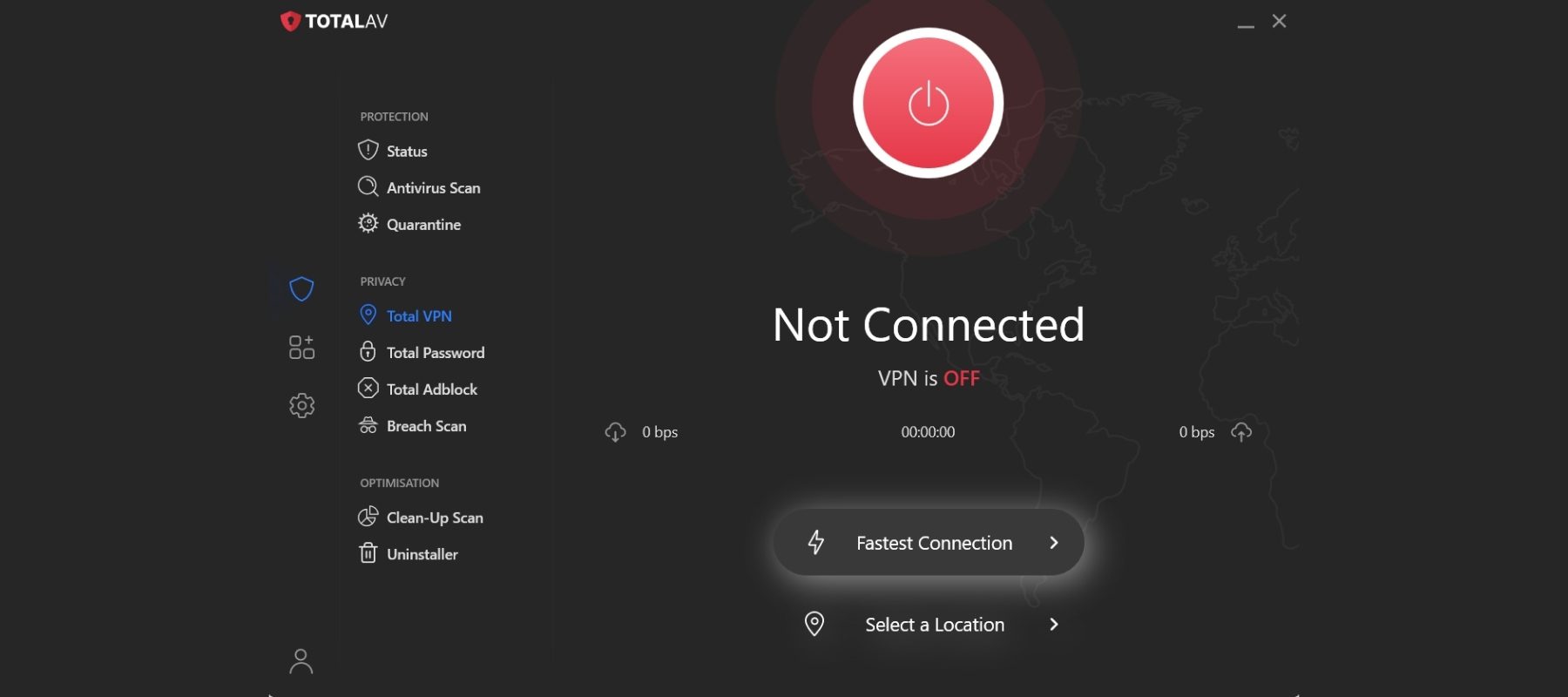
We tested TotalAV’s virtual private network (VPN) on our MacBook running macOS Sequoia. We tested Total VPN from TotalAV’s left-hand menu under the Privacy section.
We learned that Total VPN’s standalone app differs from the Total VPN app that’s included with the antivirus. The standalone app offers more servers, several protocols, and split tunneling. But there’s no clarity about this from Total VPN, which can make for a confusing user experience.
The Total VPN dashboard is pretty basic and easy to grasp. There’s a giant connect button, the current server location, and an option to change locations. Although we didn’t receive a tutorial from TotalAV this time around, its simple interface makes it easy to pick up for beginners.
One issue we ran into was trying to find information on the VPN and its features. TotalAV isn’t forthcoming with any of its offerings and we wish it offered more VPN-specific language.
There isn’t much to Total VPN, but we were glad that it mostly worked. We could unblock all the Netflix libraries we tested and our speeds decreased but largely unnoticeably.
Mobile experience

We also downloaded the Total VPN app on our Android device. The mobile dashboard is basically identical to the desktop app, so we didn’t have any trouble switching from one device to the next.
On Android, Total VPN dropped our download speeds by an average of 52%, but we didn’t notice any difference while browsing. It also worked to unblock a couple of Netflix libraries.
Total VPN features
Because this VPN began as part of an antivirus package, it doesn’t have as many features as a standalone VPN providers, like Surfshark or CyberGhost. What it does offer is strong encryption and a nice list of servers as well as a user-friendly dashboard where you can quickly toggle between TotalAV features.
Server count and countries
- 1000+ servers in 90+ countries
TotalAV doesn’t list its server count, but that’s okay as long as the ones available work well, which they do. Plus the locations of the servers offered are pretty good, as there are options across Europe, Africa, and Asia.
Other top VPNs with unlisted server counts offer a similar number of countries. For instance, ExpressVPN offers 105 countries and CyberGhost offers 100 countries.
If you’re looking to access content from different countries, you’ll have plenty to choose from with this VPN. Total VPN offers server locations in Canada, Germany, Japan, and more. It also offers servers in major U.S. cities including Los Angeles, Chicago, and New York City.
No-logs policy and headquarters
- Total VPN logs policy: No logs
- Total VPN headquarters: United Kingdom
There’s not much information on Total VPN’s no-logging policy and the language in the privacy policy dances around a little bit. The most we know is that the VPN claims to not log your metadata, but there may be IP information logged.
We also know that TotalAV has been tested, at least with its antivirus product, by independent testing labs.
Unfortunately, VPNs aren’t checked for logging, so the most information we have is that the privacy policy is unclear, but it doesn’t really log your data.
Making sure your VPN doesn’t log your data is important when choosing a VPN. Data logs can be traced back to you. Since TotalAV’s headquarters is in the U.K., and England is a Five Eyes alliance country, there’s always a chance that the government can demand any logged data that any company within its borders has on you.
Kill switch
A kill switch severs your internet connection in the event your VPN connection drops. This keeps your IP address hidden even if the VPN isn’t active.
We couldn’t find the setting to turn off the kill switch, but it passed our kill switch test, so we’re not too concerned.
Split tunneling
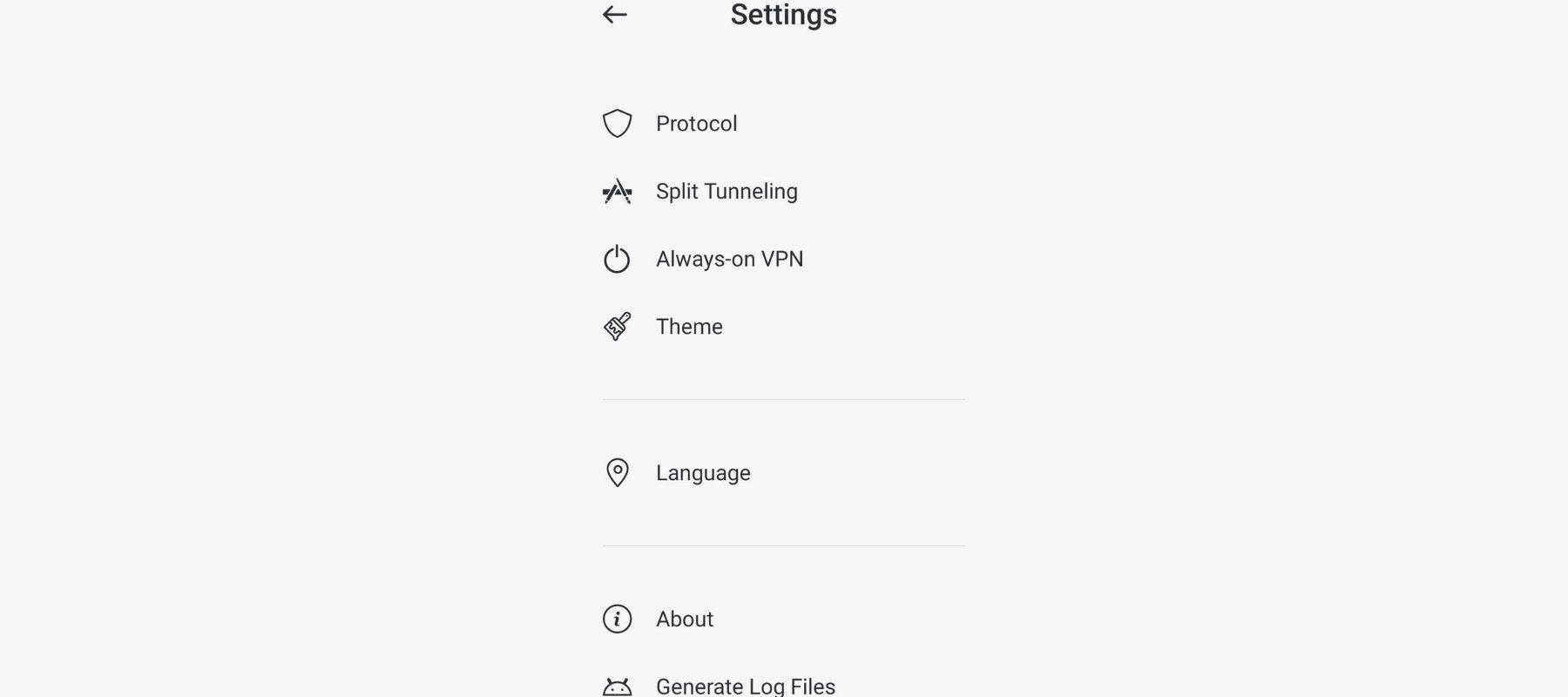
Total VPN offers split tunneling, but only on Android as far as we could tell.
Split tunneling routes traffic through multiple VPN servers or no server at all, depending on what you choose. You would need split tunneling when you log in to your mobile banking app, for example.
Most mobile banking sites don’t like VPN-encrypted traffic, so split tunneling allows you to encrypt all your traffic while also logging in to your bank quickly.
VPN protocol
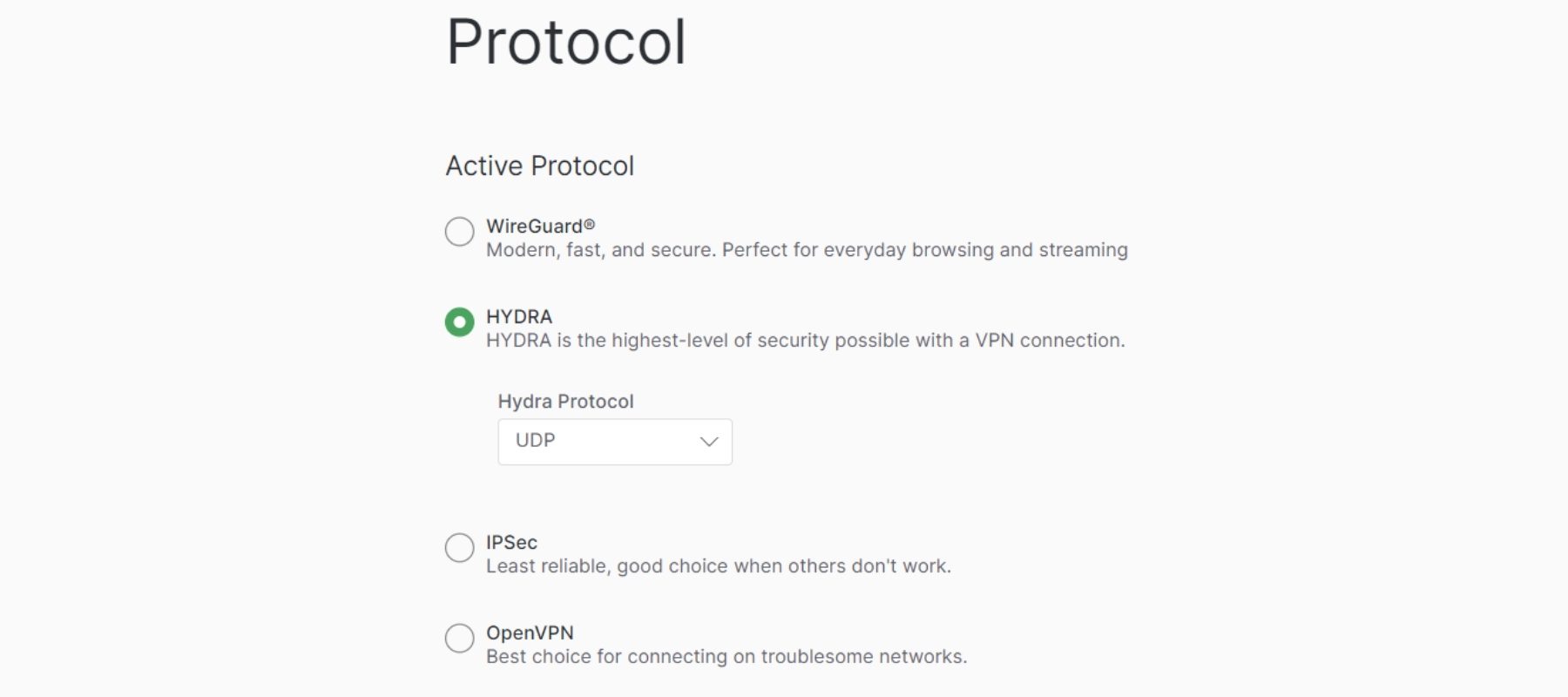
VPN protocols are what power the encryption. There are old ones and new ones. Some VPNs build their own. What matters is that it’s secure. It’s even better if you have some options, so you can choose which one you want, as they do have some benefits in various situations.
Total VPN used to offer just OpenVPN and IKEv2. We’re glad to see it’s added WireGuard, HYDRA, and IPsec since our last test.
FAQs
What VPN does TotalAV use?
TotalAV uses its own proprietary VPN, formerly known as TotalAV’s Safe Browsing VPN. It’s a solid option for keeping your online activities anonymous with its AES-256 encryption, a kill switch, and 1000+ servers in 90+ countries.
Is Total VPN safe?
Total VPN is safe because it uses AES-256 encryption, which is used by the military and financial institutions. It also claims to have a no-logs policy.
How many devices can I use with Total VPN?
A Total VPN subscription allows for 5 simultaneous connections. If you opt for a TotalAV plan that includes Total VPN, you’ll be able to cover up to eight devices.
Can Total VPN unblock Netflix?
Total VPN successfully unblocked US and UK Netflix in my tests, but struggled with other regional libraries.
Is Total VPN good for torrenting?
While Total VPN supports P2P activities, it doesn’t offer specialized servers for torrenting. The limited server network and potential privacy concerns make it a less-than-ideal choice for heavy torrent users.
Conclusion and Recommendations
After spending two weeks writing this Total VPN review, I’ve come to a somewhat mixed conclusion. While it offers some solid features, it also has some significant drawbacks that might make you think twice before subscribing.
Let’s start with the positives:
- The interface is simple and easy to use, making it great for VPN newcomers.
- It’s integrated with the TotalAV antivirus package, which could be convenient if you’re looking for a comprehensive security solution.
- The kill switch feature works well and offers both automatic and manual modes.
- It successfully unblocked some streaming services, including US and UK Netflix.
However, there are several areas where Total VPN falls short:
- The server network is quite limited, with only 50+ servers across 35 countries.
- The privacy policy lacks clarity, especially regarding logging practices.
- There are no advanced features like split-tunneling.
- Streaming performance was inconsistent across different services.
- Protocol options are limited, and there are very few configuration settings available.
- DNS leaks were detected in my tests, which is a significant privacy concern.
When it comes to using Total VPN’s features, here are a few recommendations:
- Always enable the kill switch feature to protect your privacy in case of unexpected disconnections.
- Be cautious when using Total VPN for privacy-critical tasks, given the unclear logging policy and the DNS leaks detected in my tests.
- If you’re using Total VPN for streaming, stick to US and UK servers, as these seemed to work best in my tests.
- Consider using the IKEv2 protocol for mobile devices and OpenVPN for desktop for the best balance of speed and security.
In conclusion, while Total VPN offers a user-friendly experience and some solid basic features, it falls short in several key areas that more advanced users might find crucial.
